Google's Chris Banes Open-Sourced His Jetpack Compose Skill Pack for Claude Code - https://github.com/chrisbanes/skills

I’ve been burned by AI-generated Android code more times than I can count. The code compiles but misses the mark - state scattered across mutableStateOf calls, outdated Material 2 components, or navigation routes that break type safety. If you’ve ever tried to use an AI tool to build a Jetpack Compose app, you’ve probably hit these same walls. The pattern is clear: AI tools know Kotlin syntax, but they don’t understand Compose architecture.
Chris Banes, a long-time Android engineer at Google, just open-sourced a skill pack for Claude Code that might actually fix this. It’s a set of modular SKILL.md files designed to teach the AI how to make better decisions in Kotlin and Compose projects. Instead of feeding your architectural rules into every prompt, you define them once, and Claude Code applies them automatically. The repo is live on GitHub, and it’s already solving problems that have plagued AI coding tools for years.
This post walks through what’s in the skill pack, how to set it up, and whether it’s worth your time. If you’re tired of debugging AI’s bad guesses, this might be the tool you’ve been waiting for.
The Problem This Skill Pack Solves
Why Developers Struggle with Compose Workflows
The issue isn’t a lack of developer expertise - it’s the inability of AI tools to make sound architectural decisions. Even with strong Kotlin skills, these tools often produce Compose code that misses the mark architecturally. They fail to apply unidirectional data flow properly, choose the right state primitives, or prioritize the importance of modifier order.
"The core issue? AI tools have general Kotlin knowledge but no architectural judgment for Compose. ... This is the 'vibe coding' trap." - Meet Miyani, Android Developer
Common failure points include business logic leaking into @Composable functions instead of being isolated in ViewModels, state being scattered across multiple mutableStateOf instances rather than centralized in a StateFlow, and one-shot events being modeled as booleans - causing them to re-trigger on configuration changes.
Performance problems also come into play. Without understanding Compose’s three-phase model, AI-generated code might read state in the wrong phase, skip stability annotations, or trigger unnecessary recompositions. As Chris Banes observed, "As teams start using Jetpack Compose, most of them eventually find that there is a missing piece of the puzzle: measuring the performance of your composables." In one specific module analysis, 12 out of 76 composables were restartable but unskippable due to unstable types, which negated Compose compiler optimizations.
These architectural and performance gaps create a ripple effect, making AI tools part of the problem rather than the solution.
Where Existing Tools Fall Short
Beyond architectural missteps, many AI tools rely on outdated patterns. For example, they might suggest Material 2 components instead of Material 3, use string-based navigation routes rather than type-safe alternatives, or recommend Accompanist libraries that are now part of core Compose. In Compose Multiplatform projects, these tools may even suggest Android-specific APIs like android.content.Context in shared modules, leading to build failures on iOS and desktop platforms.
"AI coding tools generate Compose code that compiles but gets the details wrong. ... They guess at behavior instead of knowing it." - aldefy, Compose Agent Skill
Documentation adds another layer of complexity. Official Android resources are designed for human developers, offering rich explanations and context. However, LLMs require concise, directive instructions with clear examples of correct and incorrect code. As skydoves put it, "A Skill is not documentation for humans. It is operational instructions for an LLM." This is why a well-crafted SKILL.md file is essential - simply linking to official docs in a CLAUDE.md file doesn’t address hallucination problems effectively.
What You Need Before Getting Started
Required Tools and Environment Setup
To get started, you'll need Android Studio Giraffe or a later version, Kotlin 2.0.20+ (necessary for Compose Compiler 1.5.4+), and Gradle. Make sure your project is using the 2024.x or 2025.x Jetpack Compose BOM - older versions might lack certain API support. You'll also need Git for version control. If you're planning to use npx skills add for installation, ensure Node.js is installed on your machine as well.
Installing and Configuring Claude Code
Once your environment is ready, the next step is installing Claude Code, which serves as the main interface for running the skill pack. You can grab the latest version from Anthropic's official CLI distribution. After installation, Claude Code automatically detects skills from two locations:
~/.claude/skills/for personal use across all projects.claude/skills/at the root of a specific repository for project-specific use.
Take note of a key configuration detail: if a skill involves dynamic context injection - like running git diff HEAD to provide real-time diff data - you must ensure that the disableSkillShellExecution setting is not set to true. For project-level skills, the first time you use Claude Code, it will prompt a workspace trust dialog. Accepting this is necessary to allow the skill to run tools like Bash, Read, and Grep. Additionally, any changes made to the skills directories will require restarting Claude Code for the updates to take effect.
Once Claude Code is installed and configured, you can move on to setting up the skill pack repository.
Cloning the Skill Pack Repository
To set up the skill pack, clone the repository from https://github.com/chrisbanes/skills to a stable local directory. A recommended approach is to clone it into a source directory like ~/.claude/skills-sources/ and then create symbolic links for individual skill folders into ~/.claude/skills/:
git clone https://github.com/chrisbanes/skills ~/.claude/skills-sources/chrisbanes-skills
ln -s ~/.claude/skills-sources/chrisbanes-skills/compose ~/.claude/skills/compose
Using a symlink makes updating the skills straightforward - just run git pull in the source directory. After linking, you can verify your setup by running /skills in the Claude Code CLI. If everything is configured correctly, the skill will appear as active.
One critical detail: ensure that the SKILL.md file is located at the root of the linked folder. If it’s placed deeper in the directory structure, Claude Code won’t register the skill.
With the environment set up and the skill pack installed, you're ready to dive into integrating the skills into your project. The next section will cover the structure of the skill pack and how to use it effectively.
How the Skill Pack Is Organized
Directory Layout and Key Components
The repository at https://github.com/chrisbanes/skills is built with a straightforward and consistent structure. Once you clone and connect it, you’ll find five main components, each serving a specific purpose.
At the core is SKILL.md, located in the root directory. This is the only required file and includes YAML frontmatter (like name, description, and triggers) alongside the primary instructions that guide Claude when the skill is activated. To keep things efficient, aim to keep SKILL.md under 500 lines - this helps minimize token usage during processing.
Here’s a breakdown of the key components:
| Component | Path | Purpose |
|---|---|---|
| Manifest | SKILL.md |
Contains triggers, metadata, and the main workflow instructions |
| Knowledge Base | references/ |
Houses 37 on-demand documents for UI, state, testing, and performance |
| Boilerplate | assets/templates/ |
Includes pre-configured Gradle and project setup files |
| Automation | scripts/ |
Contains scripts for validation and feature generation |
| Platform Metadata | agents/ |
Configuration files for AI clients like OpenAI and Cursor |
This structure ensures every component is ready to function seamlessly when integrated with Claude Code.
How Claude Code Reads and Uses Skills
With the repository in place, here’s how Claude Code utilizes these components to deliver dynamic capabilities.
Claude Code scans the .claude/skills/ directories and parses the YAML frontmatter of each SKILL.md file. Initially, it only loads the description field, leaving the rest of the file untouched until a relevant prompt or a manual /compose command triggers it.
The fields description and when_to_use in the frontmatter are particularly important for automatic triggering. Claude evaluates incoming prompts against these fields to determine which skill to activate. As noted by skydoves in the Agent Skills community:
"Skill descriptions matter more than the body. Claude uses the description to decide whether to invoke a skill. Vague descriptions equal skills that never fire."
Once a skill is triggered, the full content of SKILL.md is injected into the conversation as a single message. This content stays active for subsequent interactions. If the session gets lengthy and token compaction becomes necessary, Claude retains the most recent skill invocation within a 25,000-token limit - allocating up to 5,000 tokens per skill.
Additionally, the !<command> syntax provides a way to inject live shell output directly into the prompt before Claude processes it. This feature is particularly useful for tasks like embedding compiler reports or showing the current git diff, offering Claude a real-time view of the project’s state.
Connecting Claude Code to the Skill Pack
Pointing Claude Code to the Skill Pack
With the repository cloned and the environment set up, the next step is integrating Claude Code with the skill pack. This involves copying the compose-expert directory, as Claude Code identifies skills based on their location.
To make the skill globally available, copy the compose-expert directory into your personal skills folder:
mkdir -p ~/.claude/skills && cp -r <cloned-repo-path>/skills/compose-expert ~/.claude/skills/
For a project-specific setup, place the directory within the .claude/skills/ folder at your project root. Claude Code monitors both locations for changes, meaning updates are applied automatically without restarting the CLI.
Alternatively, you can add the skill via the plugin marketplace:
/plugin marketplace add aldefy/compose-skill
/plugin install compose-expert
Skills installed through the plugin marketplace use a namespaced slash command (e.g., /compose-skill:compose-expert) to prevent conflicts with locally added skills.
Claude Code will automatically trigger the skill when it detects keywords like @Composable, remember, LazyColumn, or NavHost during a conversation.
Adjusting Skill Behavior for Your Project
To tailor the skill for your project, modify the SKILL.md file's frontmatter. Use the description and when_to_use fields to define when the skill should activate. For example, if your project uses a custom design system or libraries like haze, include those terms to ensure Claude recognizes them as triggers.
The paths field allows you to scope the skill to specific modules using glob patterns. This is especially useful for monorepos where Compose-specific guidance might not be relevant in certain modules, such as :data or :network. Patterns like feature/** or ui-components/** help keep the skill focused where needed.
To provide version-specific information, you can inline your version catalog in SKILL.md:
## Versions
!`cat gradle/libs.versions.toml`
This ensures Claude has access to the exact compose-bom version being used, eliminating the need for manual input. Any changes to SKILL.md are applied immediately in an active session, so there's no need to restart the CLI.
If you want the skill to activate only when explicitly invoked, set disable-model-invocation: true in the frontmatter.
Once these customizations are in place, you can move on to configuring platform-specific settings.
Managing Platform-Specific Configurations
Platform-specific adjustments primarily involve shell configuration. On macOS and Linux, the default bash shell requires no additional setup. Windows users, however, need to configure the shell explicitly by setting shell: powershell in the SKILL.md frontmatter and enabling the environment variable CLAUDE_CODE_USE_POWERSHELL_TOOL=1 in their session.
| Configuration | macOS / Linux | Windows |
|---|---|---|
| Default shell | bash |
bash or powershell |
| Required env var | N/A | CLAUDE_CODE_USE_POWERSHELL_TOOL=1 |
| Skill path | ~/.claude/skills/ |
%USERPROFILE%\.claude\skills\ |
| Frontmatter setting | shell: bash |
shell: powershell |
When referencing bundled scripts located in directories like scripts/ or references/, use the ${CLAUDE_SKILL_DIR} substitution variable instead of hardcoding paths. This ensures compatibility across platforms.
Finally, ensure that tool names listed in the allowed-tools field are case-sensitive. For instance, Bash, Read, and Grep will work as expected, whereas lowercase versions like bash or grep will not. Incorrect configurations will prevent Claude from executing those tools.
Core Workflows the Skill Pack Enables
Building UI Layouts and Managing State
The skill pack enforces a structured three-tier UI pattern to keep things organized: route composables handle ViewModel management and lifecycle states, screen composables focus on rendering based on state and callbacks, and leaf composables deal with localized UI effects like focus or animations. One standout feature is how Claude Code applies this pattern automatically whenever it detects relevant @Composable functions.
For state management, the skill emphasizes centralizing state within a ViewModel using StateFlow, which makes testing smoother. For one-off events like snackbars or navigation, it recommends Channel<Effect> to avoid duplicate triggers during configuration changes. It also suggests choosing the right state primitive for the job - use derivedStateOf for computed values and rememberSaveable for state that needs to persist through process deaths.
These strategies lay the groundwork for the testing workflows discussed in the next section.
Testing and Debugging Compose Projects
To streamline testing, the skill pack provides reference files tailored to specific tasks. For example, one file walks through using Turbine for testing StateFlow, SharedFlow, and Channel patterns. Another explains setting up Ktor's MockEngine for networking tests, while a third focuses on unit testing PagingSource with tools like asSnapshot and TestPager. Claude Code ensures only the relevant file is loaded, keeping things focused and efficient.
The skill also promotes a simplified MVI test strategy: trigger an event in the ViewModel, observe the resulting StateFlow or Channel effect, and validate the output. For performance debugging, it leverages Compose Compiler Metrics to identify "restartable but non-skippable" functions, which are a common cause of frame-time issues. Developers are encouraged to run these metrics on release builds, as debug builds can produce misleading results due to live literals.
Once your state logic and UI performance are verified, the skill pack offers further guidance on refining your Compose app.
Optimizing Performance and Following Best Practices
With UI management and testing handled, the skill pack shifts attention to performance tuning, essential for production-ready Compose apps.
It includes 20 recomposition rules and a table of 27 common anti-patterns, each paired with concise replacement snippets. Key optimizations include deferring state reads to the layout or draw phase (e.g., using graphicsLayer for animations) to avoid unnecessary recompositions. Another feature, strong skipping mode, can be enabled with a compiler flag, allowing composables with unstable parameters to be skipped when those parameters remain unchanged. For lazy lists, the skill ensures the use of stable keys and content type declarations, reducing redundant re-renders.
"Always measure in release plus R8 plus a real device. Debug builds lie." - skydoves
A subtle but critical anti-pattern flagged by the skill is passing Flow objects directly as parameters to composables. Instead, it advises collecting these flows in the ViewModel or at a higher UI boundary, then passing stable state down the composable tree.
Extending and Customizing the Skill Pack
Editing Skill Definitions
Once you've integrated the skills, the next step is to refine them to suit your needs. Each skill is defined in a SKILL.md file, which uses YAML frontmatter for metadata and a Markdown section for detailed instructions. Two key fields in the frontmatter - description and when_to_use - can be adjusted to reflect the terminology and requirements of your project. For instance, if you’re working with a custom Material3-based component library, you can align these fields with your internal vocabulary.
The Markdown section is where your project-specific architecture rules take shape. Replace any vague or generic instructions with precise guidelines tailored to your workflows. For example, you could specify naming conventions for ViewModel, preferred state management approaches, or any restrictions tied to your design system. If your instructions start to exceed 500 lines, consider moving larger content - such as API specifications or detailed code examples - to a references/ subdirectory. This keeps the skill file concise and reduces unnecessary token usage, ensuring efficiency.
Another useful frontmatter field is paths, which allows you to limit a skill's scope to specific file patterns (e.g., **/*.compose.kt). If there are skills you only want triggered manually, set disable-model-invocation: true in the frontmatter. These adjustments make your skills more precise and context-aware, laying the groundwork for the next step: embedding real code examples.
Adding Real Compose Examples to Skills
"A skill is not documentation for humans. It is operational instructions for an LLM. That changes the writing voice: terse, imperative, RIGHT and WRONG snippet pairs, MUST and MUST NOT directives in bold caps." - skydoves
You can make your skills far more effective by including clear code examples that show both correct and incorrect approaches. For instance, if you're optimizing animation performance, you might include a snippet showing proper usage of Modifier.offset { IntOffset } (correct) alongside the improper Modifier.offset() (incorrect). These examples give Claude unambiguous rules to follow.
When looking for reliable code samples, repositories like Tivi and Haze are excellent references. To keep these examples relevant, consider injecting live source code into the skill context. For example, running a command like !`grep -r "LazyColumn" /path/to/tivi` can pull current usage patterns directly into the skill file, ensuring that Claude works with up-to-date practices.
End each skill with a checklist to verify that generated code adheres to your examples. This step reinforces the rules and ensures consistency, making your skills both reliable and easy to maintain.
Keeping the Skill Pack Up to Date
Streamline updates by using symlinks for community skills. Clone the repository to a stable local path and symlink the skill folders into ~/.claude/skills/. When updates are available, a simple git pull in the source directory will synchronize everything.
For internal customizations, use the project-level .claude/skills/ directory instead of modifying the cloned community files directly. Claude Code follows a hierarchical loading order: Enterprise, Personal (~/.claude/skills/), and then Project (.claude/skills/). This means project-level skills will override those from higher levels, keeping your changes isolated while maintaining compatibility with upstream updates.
If you're working with a specific Compose BOM version and want to prevent Claude from suggesting incompatible APIs, you can pin the version directly in the SKILL.md frontmatter.
| Update Method | Best For | Maintenance Action |
|---|---|---|
| Symlinking | Community GitHub repos like chrisbanes/skills |
git pull in source directory |
| Git Submodule | Project-specific integration with version locking | git submodule update --remote |
| Manual Copy | Heavily modified, diverged skill forks | Manual file diffing and replacement |
How to Create Good Agent Skills | Claude Code Guide
Common Problems and How to Fix Them
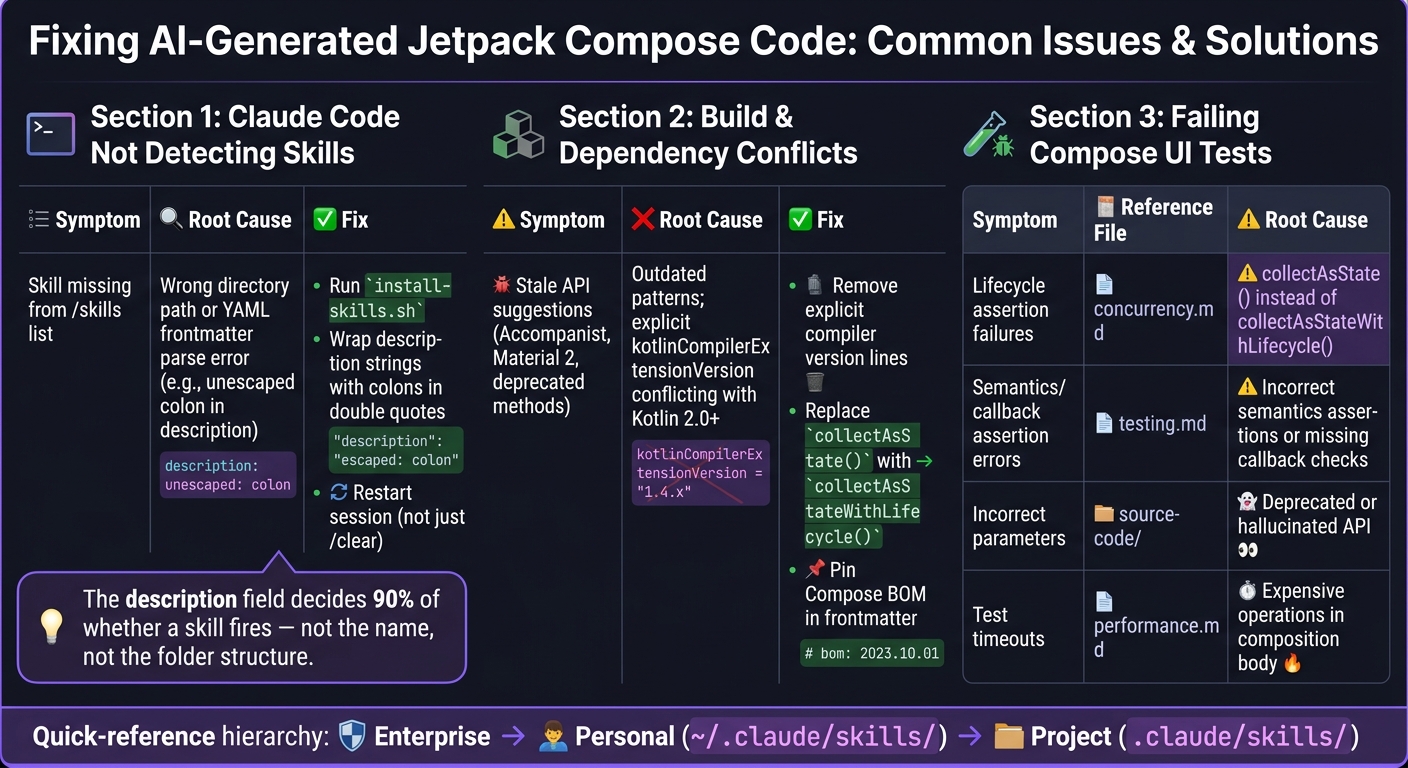
Fixing AI-Generated Compose Code: Common Issues & Skill Pack Solutions
This section addresses recurring issues you might face while integrating the skill pack into your Compose projects. By tackling these challenges head-on, you can ensure smoother workflows and adherence to the project-specific guidelines mentioned earlier.
Claude Code Not Detecting Skills
One of the most frequent problems is Claude Code failing to detect skills. Start by confirming that the skills are in the correct directory for either project-local or global use. Use the bundled script install-skills.sh to symlink nested folders into the flat structure that Claude expects.
After verifying the paths, execute /skills list to check if the skill is loaded. If it’s still missing, the issue might lie in the SKILL.md frontmatter. YAML parsing errors - often caused by an unescaped colon in a description string - can prevent the skill from loading. To fix this, inspect the frontmatter and wrap any strings containing colons in double quotes. Keep in mind that if you modify or add a skill during an active session, you’ll need to restart the Claude Code session entirely; /clear won’t suffice.
"The description field decides 90% of whether a skill fires - not the name, not the folder structure. The description." - Claude Lab
If the skill appears in /skills list but the /compose-expert command doesn’t work, it’s likely because user-invocable: true is missing from the frontmatter. Without this flag, Claude can invoke the skill internally, but you won’t be able to trigger it manually. For further troubleshooting, use /skills debug <skill-name> or examine the session logs at ~/.claude/logs/session-$(date +%Y%m%d).log.
Build and Dependency Conflicts
Once you’ve resolved detection issues, the next step is to address build and dependency conflicts.
For projects using Kotlin 2.0 or later, the Compose compiler is included with the Kotlin plugin. Remove any explicit kotlinCompilerExtensionVersion lines to allow the Kotlin plugin to manage this dependency automatically. Additionally, ensure you pin your Compose BOM version in the frontmatter to avoid compatibility issues caused by outdated patterns.
Another common issue is stale API suggestions from Claude. For instance, you might encounter generated code using deprecated Accompanist libraries or Material 2 components. Replace any use of collectAsState() on Android UI flows with collectAsStateWithLifecycle() to prevent unnecessary recompositions when the UI is in the background.
"A stability config is a contract with the compiler, not a magic spell. Break the contract and you silently miss recompositions." - skydoves
Finally, focus on resolving UI test failures for a more reliable CI/CD pipeline.
Fixing Failing Compose UI Tests
AI-generated code often leads to test failures in three main areas: lifecycle management, assertion errors, and incorrect APIs.
For lifecycle-related issues, the problem usually stems from using collectAsState() instead of collectAsStateWithLifecycle(). Refer to the concurrency.md guide for details. Assertion failures often result from incorrect semantics assertions or missing callback checks - consult the compose-agent/references/testing.md guide for help.
If the tests fail due to incorrect parameters or deprecated method signatures, it’s likely that Claude generated an outdated API call. Cross-check the generated code with the source-code/ directory in the skill pack. The files runtime-source.md and material3-source.md provide accurate implementation details.
Test timeouts are another common issue, typically caused by expensive I/O operations or O(N) list manipulations within the composition body. Move such operations to a LaunchedEffect or a ViewModel to resolve this. The performance.md guide outlines the best practices for handling these scenarios.
| Symptom | Reference File | Root Cause |
|---|---|---|
| Lifecycle assertion failures | concurrency.md |
collectAsState() instead of collectAsStateWithLifecycle() |
| Semantics/callback assertion errors | testing.md |
Incorrect semantics assertions or missing callback checks |
| Incorrect parameters | source-code/ |
Deprecated or hallucinated API |
| Test timeouts | performance.md |
Expensive operations in the composition body |
FAQs
Will this skill pack actually improve Compose architecture, not just syntax?
Chris Banes' Jetpack Compose Skill Pack fine-tunes AI-assisted development by embedding practices that prioritize correctness, natural usage, and efficiency in the generated code. While it primarily focuses on refining syntax and aligning with established standards, it also promotes better architectural practices indirectly. By emphasizing principles such as state hoisting, managing recomposition effectively, and lifecycle-aware patterns, the skill pack helps developers create Compose projects that are easier to scale and maintain - without requiring a complete architectural overhaul.
How do I install the skill pack so Claude Code reliably detects it?
To get the Jetpack Compose Skill Pack working smoothly with Claude Code, you'll need to follow the setup instructions from the repository. Here are the key commands:
- Using Plugin Marketplace: Run
/plugin marketplace add aldefy/compose-skilland then/plugin install compose-expert. - Using Copilot CLI: Use
copilot plugin install aldefy/compose-skill.
If you prefer setting it up manually, check out the INSTALL.md file in the repository for a step-by-step guide.
How can I customize triggers and limit the skill to only my UI modules?
To fine-tune when and where a skill activates, you can use frontmatter in your SKILL.md files. This allows you to set specific triggers that limit the skill's functionality to your designated UI modules. Start by organizing your UI code into clearly defined modules or directories. Then, configure the skill’s activation parameters so it operates exclusively within those areas. This approach keeps the skill focused on your UI work, ensuring it doesn’t interfere with other sections of your project.
Related Blog Posts
- How to Build Self-Improving Agentic AI Workspaces
- html-anything: The Agentic HTML Editor That Skips API Keys and Uses Your Claude Code Login - https://github.com/nexu-io/html-anything
- native-feel-skill: A Claude Agent Skill Distilled From Reverse-Engineering Raycast - https://github.com/yetone/native-feel-skill
- huashu-md-html: A Claude Code Skill for Markdown↔HTML Without the AI Slop - https://github.com/alchaincyf/huashu-md-html
Member discussion